
Twitter has changed the way third parties, such as Adjix, interface with their system. This change begins today as Twitter will limit the rate at which third parties can authenticate a user with their Twitter username and password. Throughout the rest of the month, Twitter will continue to throttle the access rate and then completely eliminate username and password authentications on August 31.
The reason for this change is so that Twitter users no longer need to give out their Twitter username and password to third party websites.
The Future
The new method that will replace username and password authentications is called OAuth and this change has been jokingly referred to as the "Oauthcalypse" since some Twitter websites and applications will, undoubtedly, fail to make the change and get left behind.
Instead of giving out a Twitter username and password, users will click on a button which will take the user from the third party website to the Twitter website where they can authorize the third party (i.e. Adjix) to post to Twitter on their behalf. A big advantage of this technique is that a Twitter user can revoke access from a third party by logging into their Twitter account:
(Settings -> Connections -> Revoke Access). In the past, revoking access meant that a user would have to change their Twitter password and then update all of their other Twitter clients, such as TweetDeck, twitpic, etc. with the new password.
Changes for Adjix Linkers
Adjix has deployed the new changes which affects Adjix Linkers who use the Adjix2Twitter bookemarklet for sending out tweets.
To update your Adjix account, simply log into your Adjix Linker account, click Edit Profile, and then click on the Twitter button. Twitter will display a page to confirm that you want to connect your Adjix account with your Twitter account. Just as before, you can configure Adjix to tweet out to one or two of your Twitter accounts.
Don't hesitate to let us know if you have any questions.
Showing posts with label New Features. Show all posts
Showing posts with label New Features. Show all posts
Monday, August 16, 2010
Tuesday, September 29, 2009
Custom Domain Name Redirect
We've rolled out a new feature for people who use Adjix with their own domain name. Now, you can have the root of your domain redirect to your own website instead of Adjix.
To enable this feature simply log into your Adjix Linker account and click on Edit Profile. There, you'll see a new option:
Redirect personal domain root to:

Simply enter the destination landing page and whenever someone enters the root of your link URL we'll automatically redirect them.
This feature should have been obvious, but we didn't implement it until Dave Winer asked it.
For example, Dave's Adjix links look like: http://r2.ly/w2g6
Now, the root of his links (http://r2.ly) automatically redirect, through Adjix, to http://newsriver.org/river2
To enable this feature simply log into your Adjix Linker account and click on Edit Profile. There, you'll see a new option:
Redirect personal domain root to:

Simply enter the destination landing page and whenever someone enters the root of your link URL we'll automatically redirect them.
This feature should have been obvious, but we didn't implement it until Dave Winer asked it.
For example, Dave's Adjix links look like: http://r2.ly/w2g6
Now, the root of his links (http://r2.ly) automatically redirect, through Adjix, to http://newsriver.org/river2

Thursday, August 20, 2009
Own Your Links: Adjix Link Bucket Backup
Backstory: Zi.ma & Tr.im
This year, two URL shorteners have closed up operations with some spectacular publicity. Earlier this year, the owner of Zi.ma was sentenced to three years in prison and zi.ma links stopped working. Additionally, over the past 10 days, TechCrunch ran many stories about Tr.im closing down.
Community Solutions
In response to Tr.im's news, Gnip.com announced 301Works.org which is an independent URL mapping directory service. Adjix has joined 301Works in our efforts to battle broken links, also known as link rot.
Independently, Adjix deployed a new feature, this past week, to help stop link rot. We don't have an official name for this feature yet, but we currently refer to it as the Adjix Link Bucket Backup.
Link Ownership and Branding
This new Adjix feature now gives you a tremendous amount of flexibility. For starters, you can use your own domain name, in the link, in place of adjix.com or ad.vu. If you name your S3 bucket go.example.com then your links can look like http://go.example.com/1234.
Peer Review
We're proud to say that our technique has been peer reviewed by at least one official member of the Digirati, Dave Winer, who was recently proclaimed as "the biggest innovator of the web" by another Digirati member, John C. Dvorak.
Process
The Adjix Link Bucket Backup process is simple: When you shorten a link with Adjix, we will save a working copy of the link to your Amazon S3 bucket.
Cost?
Adjix charges nothing for this service. However, your monthly storage and bandwidth charges from Amazon might be about $0.10/month. Yes, Amazon will really bill you as little as a nickel or a dime each month.
How To Do It?
1. Create an Amazon S3 bucket and name it with your sub-domain (i.e. go.example.com).
2. Share your bucket with Adjix so we can save a copy of each link that you create with us. Step-by-step instructions for doing this are here: http://adjix.com/tt3b
3. Log into your Adjix account and click Edit Profile. At the bottom, just enter the name of your bucket.
4. Optional: If you want to use your domain's root name (i.e. example.com) instead of a sub-domain (i.e. go.example.com) then you'll have to use your registrar's domain name forwarding option (see paragraph entitled Domain Name Forwarding) and forward your domain to http://s3.amazonaws.com. The reason for this is that DNS doesn't not allow a domain's root to point to a CNAME - it must be an A Record.
Options
You have two options for hosting your links. You can choose to point your sub-domain's CNAME to partner.adjix.com and Adjix will track stats for you. Or, you can set your sub-domain's CNAME to http://s3.amazonaws.com and the links will be served up directly from your S3 bucket.
Here are four, live, examples. I encourage you to curl and dig them (UNIX commands).
1. http://adjix.com/tt3b
Basic, shortened, Adjix link.
Traffic stats collected by Adjix.
2. http://go.usna93.com/tt3b
Shortened link with CNAME for go.joemoreno.com pointing to partner.adjix.com.
Traffic stats collected by Adjix.
3. http://links.joemoreno.com/tt3b
Shortened link with CNAME for links.joemoreno.com pointing to S3 bucket named links.joemoreno.com.s3.amazonaws.com.
Traffic stats logged by S3 bucket logging.
4. http://urlpuppy.com/tt3b
Shortened link with registrar domain name forwarding to http://s3.amazonaws.com.
Traffic stats logged by S3 bucket logging.
Your links are portable and any URL shortening service could serve up your redirects since your bucket is now the data store. In other words, 301 redirects are possible since any third party can read the links from your bucket, parse out the meta-refresh URL, tally the stats, and redirect the client's browser to the destination URL. While this may sound time consuming, this process only needs to be done once so the link can be copied to the third party's database.
No Worries
If Adjix closes up shop (which we do not intend to!), your links live on inside your bucket and they continue to work as they redirect people to their destination.
Link Portability
Since you now own your links, you'll have the freedom to move from one URL shortener to another, provided that they support this simple technique. Additionally, your users won't even be aware of which link shortening service you're using since your shortened links will be branded with your own domain name.
Stats Road Map When Serving Links Directly From Your Bucket
You can turn on your S3 bucket logging to track raw stats if you choose to serve up your links directly from your S3 bucket instead of Adjix. Also, we're researching how effective it will be to include your Google Analytics (Urchin) code in the link when we store it in your S3 bucket. If this option works as anticipated then you'll have full access to your link's stats in Google Analytics.
Feedback welcomed!
Cheers,
Joe Moreno
President
Adjix
This year, two URL shorteners have closed up operations with some spectacular publicity. Earlier this year, the owner of Zi.ma was sentenced to three years in prison and zi.ma links stopped working. Additionally, over the past 10 days, TechCrunch ran many stories about Tr.im closing down.
Community Solutions
In response to Tr.im's news, Gnip.com announced 301Works.org which is an independent URL mapping directory service. Adjix has joined 301Works in our efforts to battle broken links, also known as link rot.
Independently, Adjix deployed a new feature, this past week, to help stop link rot. We don't have an official name for this feature yet, but we currently refer to it as the Adjix Link Bucket Backup.
Link Ownership and Branding
This new Adjix feature now gives you a tremendous amount of flexibility. For starters, you can use your own domain name, in the link, in place of adjix.com or ad.vu. If you name your S3 bucket go.example.com then your links can look like http://go.example.com/1234.
Peer Review
We're proud to say that our technique has been peer reviewed by at least one official member of the Digirati, Dave Winer, who was recently proclaimed as "the biggest innovator of the web" by another Digirati member, John C. Dvorak.
Process
The Adjix Link Bucket Backup process is simple: When you shorten a link with Adjix, we will save a working copy of the link to your Amazon S3 bucket.
Cost?
Adjix charges nothing for this service. However, your monthly storage and bandwidth charges from Amazon might be about $0.10/month. Yes, Amazon will really bill you as little as a nickel or a dime each month.
How To Do It?
1. Create an Amazon S3 bucket and name it with your sub-domain (i.e. go.example.com).
2. Share your bucket with Adjix so we can save a copy of each link that you create with us. Step-by-step instructions for doing this are here: http://adjix.com/tt3b
3. Log into your Adjix account and click Edit Profile. At the bottom, just enter the name of your bucket.
4. Optional: If you want to use your domain's root name (i.e. example.com) instead of a sub-domain (i.e. go.example.com) then you'll have to use your registrar's domain name forwarding option (see paragraph entitled Domain Name Forwarding) and forward your domain to http://s3.amazonaws.com. The reason for this is that DNS doesn't not allow a domain's root to point to a CNAME - it must be an A Record.
Options
You have two options for hosting your links. You can choose to point your sub-domain's CNAME to partner.adjix.com and Adjix will track stats for you. Or, you can set your sub-domain's CNAME to http://s3.amazonaws.com and the links will be served up directly from your S3 bucket.
Here are four, live, examples. I encourage you to curl and dig them (UNIX commands).
1. http://adjix.com/tt3b
Basic, shortened, Adjix link.
Traffic stats collected by Adjix.
2. http://go.usna93.com/tt3b
Shortened link with CNAME for go.joemoreno.com pointing to partner.adjix.com.
Traffic stats collected by Adjix.
3. http://links.joemoreno.com/tt3b
Shortened link with CNAME for links.joemoreno.com pointing to S3 bucket named links.joemoreno.com.s3.amazonaws.com.
Traffic stats logged by S3 bucket logging.
4. http://urlpuppy.com/tt3b
Shortened link with registrar domain name forwarding to http://s3.amazonaws.com.
Traffic stats logged by S3 bucket logging.
Your links are portable and any URL shortening service could serve up your redirects since your bucket is now the data store. In other words, 301 redirects are possible since any third party can read the links from your bucket, parse out the meta-refresh URL, tally the stats, and redirect the client's browser to the destination URL. While this may sound time consuming, this process only needs to be done once so the link can be copied to the third party's database.
No Worries
If Adjix closes up shop (which we do not intend to!), your links live on inside your bucket and they continue to work as they redirect people to their destination.
Link Portability
Since you now own your links, you'll have the freedom to move from one URL shortener to another, provided that they support this simple technique. Additionally, your users won't even be aware of which link shortening service you're using since your shortened links will be branded with your own domain name.
Stats Road Map When Serving Links Directly From Your Bucket
You can turn on your S3 bucket logging to track raw stats if you choose to serve up your links directly from your S3 bucket instead of Adjix. Also, we're researching how effective it will be to include your Google Analytics (Urchin) code in the link when we store it in your S3 bucket. If this option works as anticipated then you'll have full access to your link's stats in Google Analytics.
Feedback welcomed!
Cheers,
Joe Moreno
President
Adjix
Tuesday, May 19, 2009
Repeat Tweeting & Top 40
Adjix is pleased to announce two new features:
Repeat Tweeting which allows you to schedule the same tweet to be sent multiple times and Top 40 which allows you to view stats on your top 40 links without needing to login.
Repeat Tweeting
Repeat tweeting allows you to schedule a delayed tweet to be sent more than once, using our Adjix2Twitter Bookmarklet. For example, if you want to send out a tweet every day, for five days, reminding people to register for an event then you can easily do this by selecting the tweet to be sent once, every 24 hours, for five days.
 Click to enlarge
To get your Adjix2Twitter Bookmarklet, just log into your Adjix Linker account and click on Bookmarklets. Here's a 40 second video demo of how it's done: http://adjix.com/g869
Top 40
With Top 40, you can now see how many people have clicked on your Adjix links without needing to login each time. You can also sort your links by either the time the link was created or by the number of hits it's received. We look back at your last 100 links and display the top 40.
Just bookmark one of the following links to see your stats (both links take you to the same place):
http://adjix.com/Top40
http://top40.adjix.com

You may have to authorize your computer, the first time you visit you Top 40, by logging into your Adjix account. But, once your computer is authorized, you're all set.
Repeat Tweeting which allows you to schedule the same tweet to be sent multiple times and Top 40 which allows you to view stats on your top 40 links without needing to login.
Repeat Tweeting
Repeat tweeting allows you to schedule a delayed tweet to be sent more than once, using our Adjix2Twitter Bookmarklet. For example, if you want to send out a tweet every day, for five days, reminding people to register for an event then you can easily do this by selecting the tweet to be sent once, every 24 hours, for five days.
 Click to enlarge
To get your Adjix2Twitter Bookmarklet, just log into your Adjix Linker account and click on Bookmarklets. Here's a 40 second video demo of how it's done: http://adjix.com/g869
Top 40
With Top 40, you can now see how many people have clicked on your Adjix links without needing to login each time. You can also sort your links by either the time the link was created or by the number of hits it's received. We look back at your last 100 links and display the top 40.
Just bookmark one of the following links to see your stats (both links take you to the same place):
http://adjix.com/Top40
http://top40.adjix.com

You may have to authorize your computer, the first time you visit you Top 40, by logging into your Adjix account. But, once your computer is authorized, you're all set.
Wednesday, April 22, 2009
Data Migration

This week, we are in the process of migrating your link click data to CSV format. This process will continue for a while since there are many millions of hits to migrate.
You'll know that your data has been migrated when you see a CSV file, next to your link, on your link stats page. We've migrated link click data up to April 15. Link clicks received after April 15 will show up where they always have: under your hits detail page.
Tuesday, March 3, 2009
Adjix2Twitter Embed Ads
We introduced a new advertising format today specifically designed to pay Twitter users who embed an ad at the end of their Twitter tweets. Payment is based on the number of followers that a Twitter user has and how much an advertiser is willing to pay for an embedded ad. We anticipate the payout from this new format will eclipse our current link shrinking ad program.
The new ad format, called Embed Ads, embeds an optional ad directly into a tweet - at the end. The ad is separated from the tweet by a blank line and the word "Ad:" - the former only shows up in SMS text messages (screen shot).
A short video demonstration of Adjix2Twitter used with Embed Ads is available here: http://adjix.com/ddew
Advertiser Info
Adjix allows advertisers to create two different types of ad campaigns. One ad campaign, called the Embed Ad Campaign, allows ads to run inside Twitter tweets. The other ad campaign which Adjix has offered since its launch in August 2008 is called the Link Shrink Ad Campaign and it allows ads to be attached to shortened (shrunk) links.
1. Advertisers can target all Twitter users or only certain Twitter users to run their ads. For example, an advertiser might only target Twitter users in certain cities or Twitter users who tweet about specific interests.
2. An advertiser may set an embargo frequency meaning that once a Twitter user embeds a specific ad, they can't rerun that same ad until the embargo time period has passed. However, the ad will be available to other Twitter users.
Advertisers can create simple Adjix Embed ad campaigns by logging into their Adjix Advertiser Account. Funds added to an advertiser's account can be used for either the Twitter Embed ad campaign or the Link Shrink ad campaign.
Advertisers set the price they are willing to pay for a Twitter user to tweet their ad. The price they set for their ad is multiplied by the number of followers of the Twitter user tweeting their ad. For example, an Advertiser who sets their ad's price at $0.001/Twitter-follower ($1 CPM) would pay $5 each time a Twitter user, with 5,000 followers, tweeted their ad. Advertisers get to see the contents of each tweet when their ad is embedded.
Twitter User (Linker) Info
Adjix users using Adjix2Twitter (also called Linkers on the Adjix website since they're usually including a link in their tweets) are presented the highest paying ads, first. However, not all Twitter users qualify for every ad - there are several reasons for this:
1. Some Twitter users may be excluded by advertisers based on region or content. (It doesn't make sense for a local, N.Y. pizzeria to have their ads run by a Twitter user who lives in Japan and tweets in Kanji).
2. Some Twitter users may encounter ads that are embargoed meaning that once they send out an ad they may have to wait a period of time before they can resend it. However, during the embargo period, the ad will be available to other qualified Twitter users.
3. A Twitter user with many followers may be beyond the budget of an advertiser. For example, a Twitter user with 100,000 followers would not have an opportunity to run an ad from an advertiser paying $1 CPM if the advertiser has less than $100 remaining in their Adjix advertiser account.
Twitter users earn revenue from Adjix based on the ad price set by the advertiser multiplied by the number of followers that Twitter user has. For example, if a Twitter user, with 1,000 followers sends out a tweet with an ad with a pays out $0.0005/follower ($0.50 CPM) then that Twitter user would earn $0.50 for that tweet. Earnings from links and earnings from Embed Ads are tracked separately in each Linker's account.
Installing the Adjix2Twitter Web Browser Bookmarklet/Plug-in
You'll need to log into your Adjix Linker account in order to get your customized Adjix2Twitter Bookmarklet. The Adjix2Twitter Bookmarklet (sometimes referred to as a plug-in) can be dragged and dropped on your web browser's toolbar in Firefox, Safari, and Chrome. It also works in Internet Explorer, but, you may need to right-click on it to save it instead of dragging and dropping it on your toolbar.
Here's a short video demonstrating how to install your Adjix2Twitter Bookmarklet (plug-in) for Firefox, Safari, Chrome, and Internet Explorer :
http://adjix.com/g869
Is there really enough room in a tweet for an ad?
Yes! Damon Cortesi, from TweetStats, was kind enough to share some private stats with me regarding the average length of a tweet. For example, Guy Kawasaki [*See disclaimer below], who has sent out close to 20,000 tweets since joining Twitter in August 2007, averages about 35 tweets/day.
Damon tells me that Guy's average tweet length is about 71 characters long or, just about half of the allowable 140 character limit.
The main Twitter account used by the NY Times, which seems to be the leading news organization that "gets it" when it comes to Twitter, also averages about 70 characters per tweet. The NY Times sends out about 40 tweets/day for a total of nearly 30,000 tweets sent, since they joined Twitter almost two years ago.
While these two Twitter "power users" only represent a small sample, it's clear that most tweets don't come close to maxing out the 140 character limit. This unused space is the perfect place for an ad. With Adjix2Twitter Embed Ads, Twitter users can see exactly what the ad will say, how much it will pay out, and whether it will fit inside their tweet before it's sent.
Advertising Opportunities Abound
We see many possible uses for Adjix Embed Ads; but, at the top of the list are news organizations. Currently, newspapers and magazines receive a large chunk of their revenue not from paying subscribers but, rather, from advertising. Now, a news organization can tweet out a headline with a link to the full text of the article followed by an Adjix Embed Ad, all in a single tweet.
Do we really need more ads?
Ads are like rainy days - no one likes them but we need a little from time to time.
Over the past decade, as the cost of delivering timely, relevant, content became cheaper, people have been less willing to pay for it. This has created many challenges in the publishing world as this industry tries to reinvent themselves since more and more people now get their news online than from print. I often joke that a newspaper is a hard copy printout of the Internet with yesterday's news. Newspapers who now think of themselves as online news outlets that happen to publish a newspaper have a much better chance of surviving compared to companies who simply think of themselves as a newspaper that happens to have a website.
Expectations
Adjix is venturing into new territory with our Embed Ads. As we stick our toe into the water, we anticipate new opportunities and challenges. Do not hesitate to contact me with your comments or questions.
Cheers,
Joe Moreno
President
Adjix
6965 El Camino Real
Suite 105-530
Carlsbad, CA 92009
j.moreno+embed@adjix.com
760.444.4721
http://www.adjix.com
Follow us on Twitter: http://twitter.com/adjix
* Disclaimer: Many people have asked Guy Kawasaki what his interest is in Adjix. As Guy has mentioned several times (and, for the record) he has no interest in Adjix other than he's an avid user of Adjix2Twitter. When Adjix launched, we were very fortunate that he tweeted about our launch and new features. He has blogged about us a couple times here and here. Last week, he reiterated his love for Adjix when a security issue was discovered. Obviously, we're very thankful for his attention. Guy is a true enabler of entrepreneurs.
The new ad format, called Embed Ads, embeds an optional ad directly into a tweet - at the end. The ad is separated from the tweet by a blank line and the word "Ad:" - the former only shows up in SMS text messages (screen shot).
A short video demonstration of Adjix2Twitter used with Embed Ads is available here: http://adjix.com/ddew
Advertiser Info
Adjix allows advertisers to create two different types of ad campaigns. One ad campaign, called the Embed Ad Campaign, allows ads to run inside Twitter tweets. The other ad campaign which Adjix has offered since its launch in August 2008 is called the Link Shrink Ad Campaign and it allows ads to be attached to shortened (shrunk) links.
1. Advertisers can target all Twitter users or only certain Twitter users to run their ads. For example, an advertiser might only target Twitter users in certain cities or Twitter users who tweet about specific interests.
2. An advertiser may set an embargo frequency meaning that once a Twitter user embeds a specific ad, they can't rerun that same ad until the embargo time period has passed. However, the ad will be available to other Twitter users.
Advertisers can create simple Adjix Embed ad campaigns by logging into their Adjix Advertiser Account. Funds added to an advertiser's account can be used for either the Twitter Embed ad campaign or the Link Shrink ad campaign.
Advertisers set the price they are willing to pay for a Twitter user to tweet their ad. The price they set for their ad is multiplied by the number of followers of the Twitter user tweeting their ad. For example, an Advertiser who sets their ad's price at $0.001/Twitter-follower ($1 CPM) would pay $5 each time a Twitter user, with 5,000 followers, tweeted their ad. Advertisers get to see the contents of each tweet when their ad is embedded.
Twitter User (Linker) Info
Adjix users using Adjix2Twitter (also called Linkers on the Adjix website since they're usually including a link in their tweets) are presented the highest paying ads, first. However, not all Twitter users qualify for every ad - there are several reasons for this:
1. Some Twitter users may be excluded by advertisers based on region or content. (It doesn't make sense for a local, N.Y. pizzeria to have their ads run by a Twitter user who lives in Japan and tweets in Kanji).
2. Some Twitter users may encounter ads that are embargoed meaning that once they send out an ad they may have to wait a period of time before they can resend it. However, during the embargo period, the ad will be available to other qualified Twitter users.
3. A Twitter user with many followers may be beyond the budget of an advertiser. For example, a Twitter user with 100,000 followers would not have an opportunity to run an ad from an advertiser paying $1 CPM if the advertiser has less than $100 remaining in their Adjix advertiser account.
Twitter users earn revenue from Adjix based on the ad price set by the advertiser multiplied by the number of followers that Twitter user has. For example, if a Twitter user, with 1,000 followers sends out a tweet with an ad with a pays out $0.0005/follower ($0.50 CPM) then that Twitter user would earn $0.50 for that tweet. Earnings from links and earnings from Embed Ads are tracked separately in each Linker's account.
Installing the Adjix2Twitter Web Browser Bookmarklet/Plug-in
You'll need to log into your Adjix Linker account in order to get your customized Adjix2Twitter Bookmarklet. The Adjix2Twitter Bookmarklet (sometimes referred to as a plug-in) can be dragged and dropped on your web browser's toolbar in Firefox, Safari, and Chrome. It also works in Internet Explorer, but, you may need to right-click on it to save it instead of dragging and dropping it on your toolbar.
Here's a short video demonstrating how to install your Adjix2Twitter Bookmarklet (plug-in) for Firefox, Safari, Chrome, and Internet Explorer :
http://adjix.com/g869
Is there really enough room in a tweet for an ad?
Yes! Damon Cortesi, from TweetStats, was kind enough to share some private stats with me regarding the average length of a tweet. For example, Guy Kawasaki [*See disclaimer below], who has sent out close to 20,000 tweets since joining Twitter in August 2007, averages about 35 tweets/day.
Damon tells me that Guy's average tweet length is about 71 characters long or, just about half of the allowable 140 character limit.
The main Twitter account used by the NY Times, which seems to be the leading news organization that "gets it" when it comes to Twitter, also averages about 70 characters per tweet. The NY Times sends out about 40 tweets/day for a total of nearly 30,000 tweets sent, since they joined Twitter almost two years ago.
While these two Twitter "power users" only represent a small sample, it's clear that most tweets don't come close to maxing out the 140 character limit. This unused space is the perfect place for an ad. With Adjix2Twitter Embed Ads, Twitter users can see exactly what the ad will say, how much it will pay out, and whether it will fit inside their tweet before it's sent.
Advertising Opportunities Abound
We see many possible uses for Adjix Embed Ads; but, at the top of the list are news organizations. Currently, newspapers and magazines receive a large chunk of their revenue not from paying subscribers but, rather, from advertising. Now, a news organization can tweet out a headline with a link to the full text of the article followed by an Adjix Embed Ad, all in a single tweet.
Do we really need more ads?
Ads are like rainy days - no one likes them but we need a little from time to time.
Over the past decade, as the cost of delivering timely, relevant, content became cheaper, people have been less willing to pay for it. This has created many challenges in the publishing world as this industry tries to reinvent themselves since more and more people now get their news online than from print. I often joke that a newspaper is a hard copy printout of the Internet with yesterday's news. Newspapers who now think of themselves as online news outlets that happen to publish a newspaper have a much better chance of surviving compared to companies who simply think of themselves as a newspaper that happens to have a website.
Expectations
Adjix is venturing into new territory with our Embed Ads. As we stick our toe into the water, we anticipate new opportunities and challenges. Do not hesitate to contact me with your comments or questions.
Cheers,
Joe Moreno
President
Adjix
6965 El Camino Real
Suite 105-530
Carlsbad, CA 92009
j.moreno+embed@adjix.com
760.444.4721
http://www.adjix.com
Follow us on Twitter: http://twitter.com/adjix
* Disclaimer: Many people have asked Guy Kawasaki what his interest is in Adjix. As Guy has mentioned several times (and, for the record) he has no interest in Adjix other than he's an avid user of Adjix2Twitter. When Adjix launched, we were very fortunate that he tweeted about our launch and new features. He has blogged about us a couple times here and here. Last week, he reiterated his love for Adjix when a security issue was discovered. Obviously, we're very thankful for his attention. Guy is a true enabler of entrepreneurs.
Tuesday, January 13, 2009
Social Bookmarking Support Integrated into Adjix
We're happy to announce that social bookmarking for all major social networks has now been integrated directly into Adjix. When shrinking a link or posting a tweet you now have the ability to bookmark the link and "Tell a Friend" using:
Digg, Facebook, MySpace, Gmail, Yahoo! mail, Google Talk, MSN, AOL Instant Messenger, Blogger, WordPress, Delicious, StumbleUpon, BuzzUp, Reddit, Slasdot, and more.
After shrinking a link through the Adjix website, simply mouse over the text field with the shorten link and choose how you'd like to bookmark your link or spread the word.
When using Adjix2Twitter, your tweet link is automatically feed into the social bookmarking widget. From there you can edit it before bookmarking it or sending it on its way.
Please don't hesitate to let us know what you think of the Tell a Friend widget.
Cheers,
Joe
Digg, Facebook, MySpace, Gmail, Yahoo! mail, Google Talk, MSN, AOL Instant Messenger, Blogger, WordPress, Delicious, StumbleUpon, BuzzUp, Reddit, Slasdot, and more.
After shrinking a link through the Adjix website, simply mouse over the text field with the shorten link and choose how you'd like to bookmark your link or spread the word.
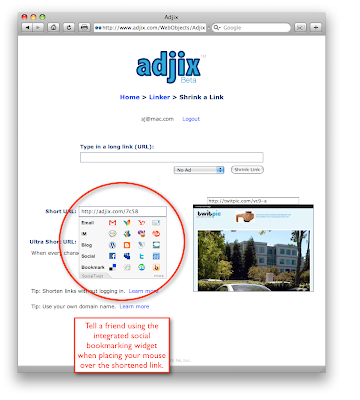 click to enlarge

When using Adjix2Twitter, your tweet link is automatically feed into the social bookmarking widget. From there you can edit it before bookmarking it or sending it on its way.

click to enlarge

Please don't hesitate to let us know what you think of the Tell a Friend widget.
Cheers,
Joe
Tuesday, January 6, 2009
Delayed Tweeting and Multiple Twitter Account Support
Today we rolled out a few key features to make using Adjix to tweet on Twitter even better.
1. Delayed Tweeting
2. Multiple Twitter Account Support
3. Adjix2Twitter with and without Link Shrink
1. Delayed Tweeting
Now you can use Adjix2Twitter to schedule tweets to be sent out either immediately or schedule them to go out hours, days, or months into the future. If you make a mistake scheduling a tweet, you can log into your Adjix Linker account and delete it.
2. Multiple Twitter Account Support
Adjix now supports multiple Twitter accounts. This is ideal for people who use one Twitter account for business and another for personal tweeting. If you already have an Adjix account then edit your profile to add a second Twitter account.
3. Adjix2Twitter with and without Link Shrink
With Adjix2Twitter Bookmarklets (also referred to as Firefox plug-ins) you have a choice: You can either shrink a link and tweet it with a single click or you can skip the link shrinking and tweet from inside your web browser in a single click.
Video: Adjix2Twitter with link shrink
Video: Adjix2Twitter without link shrink
1. Delayed Tweeting
2. Multiple Twitter Account Support
3. Adjix2Twitter with and without Link Shrink
1. Delayed Tweeting
Now you can use Adjix2Twitter to schedule tweets to be sent out either immediately or schedule them to go out hours, days, or months into the future. If you make a mistake scheduling a tweet, you can log into your Adjix Linker account and delete it.
2. Multiple Twitter Account Support
Adjix now supports multiple Twitter accounts. This is ideal for people who use one Twitter account for business and another for personal tweeting. If you already have an Adjix account then edit your profile to add a second Twitter account.
3. Adjix2Twitter with and without Link Shrink
With Adjix2Twitter Bookmarklets (also referred to as Firefox plug-ins) you have a choice: You can either shrink a link and tweet it with a single click or you can skip the link shrinking and tweet from inside your web browser in a single click.
Video: Adjix2Twitter with link shrink
Video: Adjix2Twitter without link shrink
Tuesday, November 11, 2008
Twitter Comes to Adjix
Twitter Comes to Adjix
Adjix is now integrated with Twitter. With a single click of the Adjix2Twitter Bookmarklet you can create a short link for the web page you're viewing and add your comments to be posted to Twitter. Here's a 30 second video demonstrating this new feature:
http://adjix.com/78z4
Of course, these links are trackable like any other Adjix link. Just log into your Adjix Linker account and click on Bookmarklets to get your Adjix2Twitter Bookmarklet.
Use Adjix With Your Own Domain Name
Adjix2Twitter also supports your personal domain name. In other words, if you own a domain name, such as example.com, then you can configure go.example.com or links.example.com, etc., to work with your Adjix created links by updating your Linker profile. Details here:
http://adjix.com/ms83
Why is Adjix the Best Link Shortening and Tracking Site?
This page explains it best:
http://adjix.com/5wd2
Cheers,
Joe
Adjix is now integrated with Twitter. With a single click of the Adjix2Twitter Bookmarklet you can create a short link for the web page you're viewing and add your comments to be posted to Twitter. Here's a 30 second video demonstrating this new feature:
http://adjix.com/78z4
Of course, these links are trackable like any other Adjix link. Just log into your Adjix Linker account and click on Bookmarklets to get your Adjix2Twitter Bookmarklet.
Use Adjix With Your Own Domain Name
Adjix2Twitter also supports your personal domain name. In other words, if you own a domain name, such as example.com, then you can configure go.example.com or links.example.com, etc., to work with your Adjix created links by updating your Linker profile. Details here:
http://adjix.com/ms83
Why is Adjix the Best Link Shortening and Tracking Site?
This page explains it best:
http://adjix.com/5wd2
Cheers,
Joe
Tuesday, October 21, 2008
Referral Based Tracking
 We've just added referral based tracking to Adjix. When you publish your Adjix link to different places on the web (Twitter, blog, website, discussion forum, etc.) you'll know where a person was when they clicked on your link.
In technical terms, this is known as the "referrer". In other words, let's say you post the link http://adjix.com/h4hr to both your blog and on Twitter. Each time someone clicks on it, you'll know if they were viewing your link on your blog or Twitter.
Google AdWords
Here at Adjix, we've found this feature extremely helpful when used in conjunction with Google AdWords. We take our landing page, that we use in AdWords, and run it through Adjix to get an Adjix URL which we paste into Google AdWords. Now, whenever someone clicks on our Google AdWords ad, we know exactly where Google was running our ad. Using this, we can refine which of Google's third party ad partners generate the most clicks. Also, since we collect the "clicker's" IP address we can confirm that our ads targeting the U.S. are only being run in the U.S.
Additionally, Google AdWords lags a couple hours between receiving an AdWords click and reporting it. But, with Adjix, you know instantly when your AdWords ad was clicked.
We've actually been collecting referral information for Adjix ad-free redirects for a while, so you'll see details in your Link Stats going back several weeks. We've just begun collecting the referrer data for Adjix ad links, so, newly created links, as of this week, will now have this feature.
When the Referer is "None" this usually means that the person either typed the Adjix link directly into their web browser or they clicked on it inside an e-mail.
We believe this feature along with last week's Bookmarklets announcement make Adjix a very appealing solution.
Please let us know what you think of the referral data.
Cheers,
Joe
Here at Adjix, we've found this feature extremely helpful when used in conjunction with Google AdWords. We take our landing page, that we use in AdWords, and run it through Adjix to get an Adjix URL which we paste into Google AdWords. Now, whenever someone clicks on our Google AdWords ad, we know exactly where Google was running our ad. Using this, we can refine which of Google's third party ad partners generate the most clicks. Also, since we collect the "clicker's" IP address we can confirm that our ads targeting the U.S. are only being run in the U.S.
Additionally, Google AdWords lags a couple hours between receiving an AdWords click and reporting it. But, with Adjix, you know instantly when your AdWords ad was clicked.
We've actually been collecting referral information for Adjix ad-free redirects for a while, so you'll see details in your Link Stats going back several weeks. We've just begun collecting the referrer data for Adjix ad links, so, newly created links, as of this week, will now have this feature.
When the Referer is "None" this usually means that the person either typed the Adjix link directly into their web browser or they clicked on it inside an e-mail.
We believe this feature along with last week's Bookmarklets announcement make Adjix a very appealing solution.
Please let us know what you think of the referral data.
Cheers,
Joe
Tuesday, October 14, 2008
One-Click Link Shrink
Bookmarklets
Today, we introduced Bookmarklets which let Linkers shrink URLs (web links) in a single click directly from their web browser.
Linkers no longer need to visit adjix.com in order to copy and paste links to shrink them. Now, it's as simple as a single click and the shorten link is automatically pasted into your clipboard. Each Bookmarklet is customized for each Linker.
You'll find your custom Bookmarklets under the main menu once you log into your Linker account. They work with Firefox, Internet Explorer, and Safari on Windows, Mac OS X, and the iPhone.
We've posted several video tutorials to demonstrate the power and convenience of Bookmarklets (Requires QuickTime - if you have iTunes installed then you have QuickTime):
1. Create your personal Bookmarklets video
2. One-Click Bookmarklets in action video
3. The Two-Click Bookmarklet in action video
Time Zones
Also, with today's release, we're happy to introduce time zone support. Now each Linker and Advertiser can edit their profile and set their time zone to their local time.
With the Adjix Bookmarklets, link shrinking has never been easier.
Cheers,
Joe Moreno, President
Tel. 760.444.4721

Today, we introduced Bookmarklets which let Linkers shrink URLs (web links) in a single click directly from their web browser.
Linkers no longer need to visit adjix.com in order to copy and paste links to shrink them. Now, it's as simple as a single click and the shorten link is automatically pasted into your clipboard. Each Bookmarklet is customized for each Linker.
You'll find your custom Bookmarklets under the main menu once you log into your Linker account. They work with Firefox, Internet Explorer, and Safari on Windows, Mac OS X, and the iPhone.
We've posted several video tutorials to demonstrate the power and convenience of Bookmarklets (Requires QuickTime - if you have iTunes installed then you have QuickTime):
1. Create your personal Bookmarklets video
2. One-Click Bookmarklets in action video
3. The Two-Click Bookmarklet in action video
Time Zones
Also, with today's release, we're happy to introduce time zone support. Now each Linker and Advertiser can edit their profile and set their time zone to their local time.
With the Adjix Bookmarklets, link shrinking has never been easier.
Cheers,
Joe Moreno, President
Tel. 760.444.4721

Monday, August 25, 2008
Ad-free Links Are Here!
The press and the blogosphere have been buzzing about Adjix. People aren't sure what to make of us, yet, and they're wondering what direction we're headed.
We've heard from some bloggers who love the data that we collect on their links but would sometimes prefer to do without the ads.
We listened and learned. This past weekend we implemented an ad-free link option on Adjix. Although Linkers don't generate any revenue when creating ad-free links they still get all of the same data collection they love (something our biggest competitors don't do).
In order to create an ad-free link you must log into your Linker account (your web browser must remember who you are: details). Once we know who you are, you'll now see the No Ad option:
Our ad-free Adjix links use the same basic redirect format the other popular link shrinkers use to shorten their URLs.
Additionally, you can hide the fact that you're using Adjix and private label your Adjix links so that your own domain name appears in the link instead of adjix.com or ad.vu. Details here.
- Joe
We've heard from some bloggers who love the data that we collect on their links but would sometimes prefer to do without the ads.
We listened and learned. This past weekend we implemented an ad-free link option on Adjix. Although Linkers don't generate any revenue when creating ad-free links they still get all of the same data collection they love (something our biggest competitors don't do).
In order to create an ad-free link you must log into your Linker account (your web browser must remember who you are: details). Once we know who you are, you'll now see the No Ad option:

(click to enlarge image)

Our ad-free Adjix links use the same basic redirect format the other popular link shrinkers use to shorten their URLs.
Additionally, you can hide the fact that you're using Adjix and private label your Adjix links so that your own domain name appears in the link instead of adjix.com or ad.vu. Details here.
- Joe
Subscribe to:
Posts (Atom)